The Galaxy S2 comes standard with their Memo app, which you'd basically use to make quick notes:
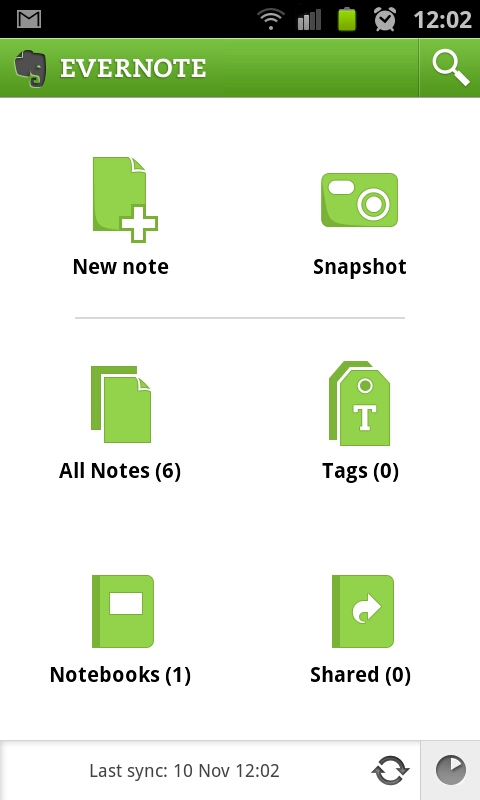
It works ok, but I'm not too fond of it. I decided to look for an alternative, and found Evernote - the nice thing about Evernote, is it includes the ability to take a quick picture or video or even voice recording, as well as traditional text notes. Also, a very handy widget is available.
Furthermore, you must create an online account, which means your notes gets synchronized with the Evernote website, so you can access your notes from pretty much every where.
It works a lot better than the default Memo app that comes with the phone in my opinion, and I'd highly recommend getting it as soon as you can, it will really help when you need to make a note of something real quick :)
Get it here
Showing posts with label widgets. Show all posts
Thursday, November 10, 2011
Wednesday, October 12, 2011
A big THANKS (and clocks!)
Hi all! My first blog post, my intro, I did on 23 July, just a few days after I got my Samsung Galaxy S2. Since then, I've done just under 40 blog posts about apps and widgets and games and everything in between about my phone!
I've had great feedback so far, and I keep getting more and more visitors every week, so thanks to all for visiting! Since July I've had more than 10000 page views on this blog, and without my loyal readers and followers that wouldn't have happened!
Anyway, I'll try my best to keep the good posts coming, I still have lots to cover about my phone, and now that I've used an Android based device, I'll never go back! Don't get me wrong, my wife has the iPhone 4, and it's also a great device, and lots of my friends are very loyal to their Blackberries!
Well, thanks again for the great feedback and support so far!
Just for fun, here is my 6th home screen on my phone, it has all the analogue clocks that comes standard with the Galaxy S2:
And, as always, till next time!
I've had great feedback so far, and I keep getting more and more visitors every week, so thanks to all for visiting! Since July I've had more than 10000 page views on this blog, and without my loyal readers and followers that wouldn't have happened!
Anyway, I'll try my best to keep the good posts coming, I still have lots to cover about my phone, and now that I've used an Android based device, I'll never go back! Don't get me wrong, my wife has the iPhone 4, and it's also a great device, and lots of my friends are very loyal to their Blackberries!
Well, thanks again for the great feedback and support so far!
Just for fun, here is my 6th home screen on my phone, it has all the analogue clocks that comes standard with the Galaxy S2:
And, as always, till next time!
Monday, October 3, 2011
Some nice Widgets
One of the many many ways to customize your Galaxy S2, is by adding custom widgets to your home screen. These come in all shapes and sizes, and most of them give you several options on how the widgets looks and works, etc.
Here is one of my screens filled with some widgets I like:
1. The first one I have on there is the APN on/off widget - what that basically does is it turns off cellular data (very handy if you live in South Africa, and cannot afford the ludicrously expensive data packages available) - get it here
2. The second one might puzzle you a bit, it's my Blizzard Battle.net Mobile Authenticator - if you play any of Blizzard's games on your PC (Like World of Warcraft or Star Craft 2), then this is just a little extra security. When logging in on your Battle.net account, it will also ask for the code this widget generates. It keeps on generating new ones, so if you're also worried about account theft, then you got to get this on your Android phone - get it here
3. Next to that I have a flash light widget, which instantly turns on the LED on the back of my phone, turning it into a handy flash light :) - get it here
4. The first icon in my second row is a link to one of my Google Reader feeds (to this blog actually) - for that I have the 3rd party Google Reader app gReader - I find it works a bit better than Google's own version. Get it here
5. Then I have a data counter widget, showing me the amount of incoming and outgoing data for the month, both for Wi-fi and 3G - once again a handy little app if you have to pay extra for cellular data - get it here
6. Next to that is a battery widget, the normal battery icon doesn't give you an exact estimate of how much battery life you have remaining, this one gives you a nice percentage value - get it here
7. This is the stock standard Google Search Widget that comes with the phone, here you can type anything in, and search either the web, your apps, your contacts or all of the above. You can tap the Mic icon to say what it is you are looking for :)
8. The last widget I have on here is Evernote - this is a notes taking app, and allows you to quickly take a written note, a note with a photo or video, or recording something. It works well, and is a nice and quick way of making a note. The only thing I didn't like about this one is that you must register for a free account to be able to use it on your phone - I have registered on close to a billion sites already (or so it feels). Anyway, get it here
There are lots more cool widgets out there of course. Feel free to leave a comment and suggest some of your favourite widgets, I'll have a look, and if they're as cool as you say, I'll do a little review of them!
As always, till next time!
Here is one of my screens filled with some widgets I like:
1. The first one I have on there is the APN on/off widget - what that basically does is it turns off cellular data (very handy if you live in South Africa, and cannot afford the ludicrously expensive data packages available) - get it here
2. The second one might puzzle you a bit, it's my Blizzard Battle.net Mobile Authenticator - if you play any of Blizzard's games on your PC (Like World of Warcraft or Star Craft 2), then this is just a little extra security. When logging in on your Battle.net account, it will also ask for the code this widget generates. It keeps on generating new ones, so if you're also worried about account theft, then you got to get this on your Android phone - get it here
3. Next to that I have a flash light widget, which instantly turns on the LED on the back of my phone, turning it into a handy flash light :) - get it here
4. The first icon in my second row is a link to one of my Google Reader feeds (to this blog actually) - for that I have the 3rd party Google Reader app gReader - I find it works a bit better than Google's own version. Get it here
5. Then I have a data counter widget, showing me the amount of incoming and outgoing data for the month, both for Wi-fi and 3G - once again a handy little app if you have to pay extra for cellular data - get it here
6. Next to that is a battery widget, the normal battery icon doesn't give you an exact estimate of how much battery life you have remaining, this one gives you a nice percentage value - get it here
7. This is the stock standard Google Search Widget that comes with the phone, here you can type anything in, and search either the web, your apps, your contacts or all of the above. You can tap the Mic icon to say what it is you are looking for :)
8. The last widget I have on here is Evernote - this is a notes taking app, and allows you to quickly take a written note, a note with a photo or video, or recording something. It works well, and is a nice and quick way of making a note. The only thing I didn't like about this one is that you must register for a free account to be able to use it on your phone - I have registered on close to a billion sites already (or so it feels). Anyway, get it here
There are lots more cool widgets out there of course. Feel free to leave a comment and suggest some of your favourite widgets, I'll have a look, and if they're as cool as you say, I'll do a little review of them!
As always, till next time!
Subscribe to:
Posts (Atom)