If you don't know what Minecraft is, chances are you've only started using the internet this very second. :)
Minecraft is the Indie game that took the world by storm. It's a big sandbox game where you can shape the world to your exact liking. Add to that the harvesting of resources and building stuff (anything from a small log cabin in the woods to deep underground mines and glorious works of art!), as well as zombies and sheep, and you've got a pretty amazing and addictive game!
People will complain about the blockiness of the graphics, but that is what gives this game so much charm and personality! It just shows you, a games doesn't necessarily need awesome and high detailed graphics to be awesome!
Now, the pocket edition is a work in progress, much like the desktop version was for so very long. As you can see in the above screen shot, we're on version 0.2.0 alpha. So at this stage, it's not even close to what the desktop version is, but it's definitely getting there!
I bought the game for $0.10 when Android had there massive app download drive, but you can still buy it for $6.99 - a little steep for my liking (very happy that I got it for ten cents!), but I foresee great things for this little gem in the mining (see what I did there?? Gem? Mining? Minecraft??? ;P
Luckily, a demo version is available, so you can get that to first check it out.
Get the full version here
And the demo version here
So, at this stage the game has two modes - Creative and Survival. Creative mode just gives you this big, randomly generated world which you can sculpt to your exact liking, where the Survival mode adds a few things, like gathering some resources, and fending of zombies at night!
Here is my little house by the sea, which I started when the game was still version 0.1.0 (no survival mode back then):
In the second screen shot, I'm actually flying (something you can only do in creative mode) - you'll also see the on-screen controls on the left. The button in the middle is to jump - double tap that one to fly.
I must say, the game's performance on my Galaxy S2 is extremely smooth and without drops in frames per second at all. It does take some getting used to using the onscreen controls like that. Looking around is done by tapping and moving your finger across the screen. If you tap an hold in one spot, you'll start digging that specific block if it's close enough.
Here's a few from my little house's "porch" :)
The survival mode introduces a few extra things, most notably zombies that want to do nothing but eat your brains. So the first thing you always do in a Survival game is build a shelter, so that you can survive the night's horrors!
As you can see in the above screenshot, I made my little shelter by digging out a cave in the side of a hill. I recommend doing that because it's quicker.
You'll also notice the health bar, so in Survival mode you can die! EEK! ;)
Furthermore, you can start gathering some resources, with which you can only build at this stage. In the desktop version, you can craft all kinds of stuff, like weapons, doors, furniture, traps, etc. I'm sure these will be added to the game as new versions get released! (Hopefully!)
With this version you have a limited range of blocks that you can place, but I'm sure this list will also keep growing as time goes by:
As you can see, you have an unlimited supply of most of the blocks and items, but some of them you have to gather in your adventures.
I was lucky and survived my first night :) I did face a few zombies, but that wasn't too hard:
Anyway, this is a really good little time waster, and the promise of more updates to expand the features of the game means it'll keep on getting better and better. (I'll keep everyone posted on the updates as they happen!)
One thing I haven't tried out though, is joining some friends in a multiplayer game. If you have, feel free to leave some comments on how that is! Also, if you've build a masterpiece, and would like it to be featured on this blog, please let me know, I'd love to show off some of your hard work here :D
Time to go build a basement for my house! (will post some screen shots of that later!)
Till next time!
Showing posts with label reviews. Show all posts
Friday, February 24, 2012
Tuesday, December 20, 2011
Game Review - Game Dev Story
I first saw this game on our iPad - I downloaded the free version, but wasn't prepared to pay a few dollars for it - but when it came out for $0.10 on the Android Market, I couldn't resist!
The whole idea behind the game is that you are a game developing company. With that comes doing research, hiring staff, training and leveling up the staff, doing contracts, going to gaming conferences, and, most importantly, creating games :)
You start the game by starting your game development company, and a small office with only a few employees. Also, at first, you can only develop games for the PC.
Tapping anywhere on the screen opens up the menu, from where you can do all kinds of stuff, like start development for a new game, hire, fire, train and level up your staff, check out your statistics, etc.
When you develop a new game, you get to choose a few options for it, like which platform, the genre, type, and also the direction (for example, you can allocate extra money towards how quickly you develop the game, or even double the whole budget to increase all kinds of stats for the game)
As the game progresses, several companies release consoles, which you can then buy a license and develop for. The licenses get quite expensive, but can mean you make lots more money, since they hold a much bigger market share. I like how the consoles have names like "Play Status" and "Microx 480" :)
You start with only a few options for Genre, but as your staff gets more skilled, you unlock more Genres to choose from. Each Genre you also level on its own, by using it with a suitable Game Type. A few examples for Genres are "RPG", "Action", "Shooter", etc.
Then you have a few Game Types - these can include options like "War", "Robot" and even "Swimming".
Obviously not all Genres and Types go together, but that doesn't mean you can't give it a shot anyway!
Next you select the Direction for the game:
This can improve your game, but at greater cost. Usually I select the Budget+ option if I can afford it.
Lastly, you can allocated more points in certain aspects of the game, like Realism, Cuteness or Game World:
(Hint: From what I've seen, you get more points for the Direction of the game whenever you level one of the Genres or Types to Level 5...)
After you've selected the parameters for the game you're developing, your team will get to work. Now it's mainly a case of sitting back and watch what they do. Each staff member have 4 stats, namely Program, Scenario, Graphics and Sound. As they develop the game, they add points to each of the 4 areas of the game.
In the process, they inevitably add bugs as well, which needs to get sorted out before you ship the game (or, if you want, you can ship the game with bugs and all!)
At certain stages of the game, you can select specific employees to focus on a specific area of the game, for example Graphics or Sound.
The whole idea behind the game is that you are a game developing company. With that comes doing research, hiring staff, training and leveling up the staff, doing contracts, going to gaming conferences, and, most importantly, creating games :)
You start the game by starting your game development company, and a small office with only a few employees. Also, at first, you can only develop games for the PC.
Tapping anywhere on the screen opens up the menu, from where you can do all kinds of stuff, like start development for a new game, hire, fire, train and level up your staff, check out your statistics, etc.
When you develop a new game, you get to choose a few options for it, like which platform, the genre, type, and also the direction (for example, you can allocate extra money towards how quickly you develop the game, or even double the whole budget to increase all kinds of stats for the game)
As the game progresses, several companies release consoles, which you can then buy a license and develop for. The licenses get quite expensive, but can mean you make lots more money, since they hold a much bigger market share. I like how the consoles have names like "Play Status" and "Microx 480" :)
You start with only a few options for Genre, but as your staff gets more skilled, you unlock more Genres to choose from. Each Genre you also level on its own, by using it with a suitable Game Type. A few examples for Genres are "RPG", "Action", "Shooter", etc.
Then you have a few Game Types - these can include options like "War", "Robot" and even "Swimming".
Obviously not all Genres and Types go together, but that doesn't mean you can't give it a shot anyway!
Next you select the Direction for the game:
This can improve your game, but at greater cost. Usually I select the Budget+ option if I can afford it.
Lastly, you can allocated more points in certain aspects of the game, like Realism, Cuteness or Game World:
(Hint: From what I've seen, you get more points for the Direction of the game whenever you level one of the Genres or Types to Level 5...)
After you've selected the parameters for the game you're developing, your team will get to work. Now it's mainly a case of sitting back and watch what they do. Each staff member have 4 stats, namely Program, Scenario, Graphics and Sound. As they develop the game, they add points to each of the 4 areas of the game.
In the process, they inevitably add bugs as well, which needs to get sorted out before you ship the game (or, if you want, you can ship the game with bugs and all!)
At certain stages of the game, you can select specific employees to focus on a specific area of the game, for example Graphics or Sound.
Here you can see the team hard at work:
Every once in a while, one of your staff members will ask if he/she can attempt to boost one of the aspects of the game - this has a certain percentage to succeed - if they fail, you add a whole lot of bugs to the game, which means it takes a bit longer to get finished.
You can, however, use some research points to increase the percentage of success with a boost attempt. (Research points you get as your team figures stuff out, and so on - it happens pretty much automatically)
I usually just do it, because fixing bugs at the end of development, gives you more research points (which you use to level up your staff, among others...) - so in my opinion, it's a win-win.
That's basically it, you carry on until your game has been completed, give it a name, and hope it sells.
There's a few things you can do to help make your game better - you can, for example, buy "items" from the traveling salesman who makes an appearance every now and again. Items cost 30 research points to use, and can boost one of the aspects of your game.
There's also bad stuff that can happen, like blackouts, which causes you lose some points in your current game:
It can also happen that a rival gaming company is developing a similar game to yours, which means fewer sales.
You can advertise as well, which costs money, but increases your fan base (your fan base even ages as time goes by, so you lose some, and get some new ones).
Then there's contracts you can do for a quick buck, and even the annual GameDex (gaming conference) and Gaming awards!
For a small game like this, there's definitely lots of aspects to keep you coming back for more!
This is probably the game I'm playing most at the moment - it's lots of fun, and well worth the money in my opinion! You can always try out the demo of course, but I'm sure you won't be sorry if you buy the full version - it's selling for $3.00 or so, I was very lucky to have paid only $0.10 - but knowing what I know now, I'd buy it for the full price as well!
Get it here
Till next time!
Thursday, November 10, 2011
Galaxy S2 Photo Editor
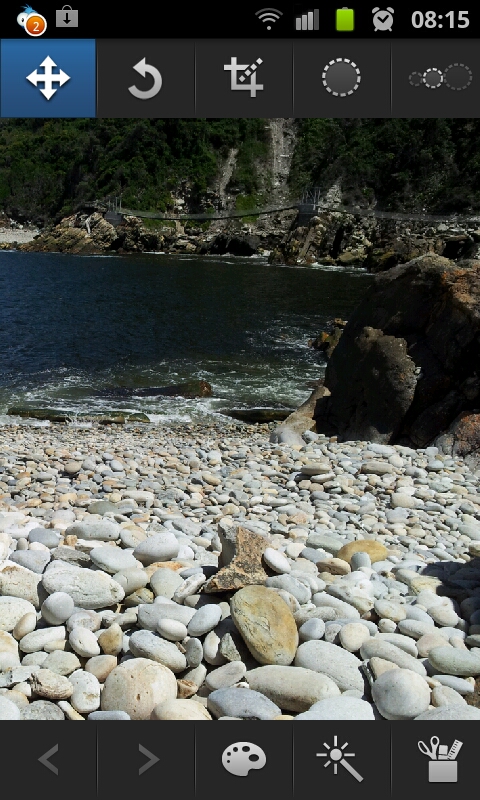
The Galaxy S2 comes standard with a very decent photo editor app, called, wait for it :) - "Photo editor" - very handy for a few quick touch ups, cropping or rotating. It's not a full Photoshop type app, but for every day use, it does the job nicely!
In this post I'll quickly go over all the features it has - starting the app, allows you to select which image you want to edit:
You can either select an existing image, or take a new one... Once you've selected the photo you want to edit, you'll get a neat interface with everything you need right there:
The next one you'd need would be a cropping tool - we always get stuff like fingers or bystanders that spoil the photo, so cropping the pic can easily fix that. It can even turn a crappy photo into a MASTERPIECE!!!
This little app also have several selection related tools and features, which allows you to make edits to only certain parts of a photo:
At the bottom you'll see a back and forward button, so you can undo and redo any steps you take... Next to that you have a paint pallet icon, which gives you options to play with the brightness and contrast settings:
The magic wand tool gives you options to make some blur related changes to your selection (you need to make a selection first for this to work):
The final tool in the list gives you some other effects you can apply to your pic:
So there you have it, that covers the stock standard "Photo editor" that comes by default with the Galaxy S2 - it's got enough to allow you to do the basics, but it won't be used by professional photographers :) (they'll anyway rather use their PC or Mac)
I'll have a look to see what alternatives to the standard photo editor there are out there, and maybe do some reviews on them too.
Till next time!
In this post I'll quickly go over all the features it has - starting the app, allows you to select which image you want to edit:
You can either select an existing image, or take a new one... Once you've selected the photo you want to edit, you'll get a neat interface with everything you need right there:
The most basic feature any decent photo editor app must have is a rotate one, and luckily, this one does! It also includes "flip horizontally" and "flip vertically" features:
The next one you'd need would be a cropping tool - we always get stuff like fingers or bystanders that spoil the photo, so cropping the pic can easily fix that. It can even turn a crappy photo into a MASTERPIECE!!!
This little app also have several selection related tools and features, which allows you to make edits to only certain parts of a photo:
At the bottom you'll see a back and forward button, so you can undo and redo any steps you take... Next to that you have a paint pallet icon, which gives you options to play with the brightness and contrast settings:
The magic wand tool gives you options to make some blur related changes to your selection (you need to make a selection first for this to work):
The final tool in the list gives you some other effects you can apply to your pic:
So there you have it, that covers the stock standard "Photo editor" that comes by default with the Galaxy S2 - it's got enough to allow you to do the basics, but it won't be used by professional photographers :) (they'll anyway rather use their PC or Mac)
I'll have a look to see what alternatives to the standard photo editor there are out there, and maybe do some reviews on them too.
Till next time!
Wednesday, October 5, 2011
How to turn off the "fully charged" sound
If you also have a Samsung Galaxy S2, by now you would have noticed that the phone gives you a nice and loud ding when it's fully charged, which is perfect if you want to be awoken in the middle of the night!
Unfortunately, there isn't a way to turn of this bloody annoying sound with the normal settings - you can root your device, but most users don't know how (or don't want to) do that - me included. Luckily, someone has created a nice little app especially for the Galaxy S2, that mutes your phone just before it gets fully charged. It even has some settings, like when you want the app to be "active" and so on.
Aside from that, it doesn't do anything else, but it's a great app if you charge the phone overnight in your room when you sleep.
Get it here
Till next time!
Unfortunately, there isn't a way to turn of this bloody annoying sound with the normal settings - you can root your device, but most users don't know how (or don't want to) do that - me included. Luckily, someone has created a nice little app especially for the Galaxy S2, that mutes your phone just before it gets fully charged. It even has some settings, like when you want the app to be "active" and so on.
Aside from that, it doesn't do anything else, but it's a great app if you charge the phone overnight in your room when you sleep.
Get it here
Till next time!
Wednesday, September 21, 2011
App Review: Instant Heart Rate
Ok, this review isn't of the biggest and awesomest apps out there, but it's of a cool one nonetheless! Last night I was browsing the app market, and saw Instant Heart Rate there in the list, and I had to investigate - I quickly downloaded and installed it, and a few seconds later I had a reading of my heartbeat!
Pretty neat trick for a phone that is! How it works is it uses the phone's camera and LED flash, and you basically hold your index finger on the lens - it then calibrates for a few seconds, and starts recording your heartbeat.
That's pretty much it. I reckon the main reason anyone would want this it to show off :) Oh, I guess fitness fanatics would also like it (but that is definitely not the reason I got it hehehe......)
Get it here.
Till next time!
Pretty neat trick for a phone that is! How it works is it uses the phone's camera and LED flash, and you basically hold your index finger on the lens - it then calibrates for a few seconds, and starts recording your heartbeat.
That's pretty much it. I reckon the main reason anyone would want this it to show off :) Oh, I guess fitness fanatics would also like it (but that is definitely not the reason I got it hehehe......)
Get it here.
Till next time!
App Review: Recipe Search
I've realized over the years that I actually enjoy preparing food, but it's usually just simple stuff, like the age old favourite, Spaghetti Bolognaise, or toast... :)
I was browsing the app market, and saw Recipe Search there in the list, and decided to download it to have a look what it's about:
It's basically an app that gives you access to a huge online database of all kinds of different recipes. It also has some nice features like the ability to create shopping lists, or leave comments and ratings on other people's recipes.
There's a What's new? category as well, which lists the latest recipes added:
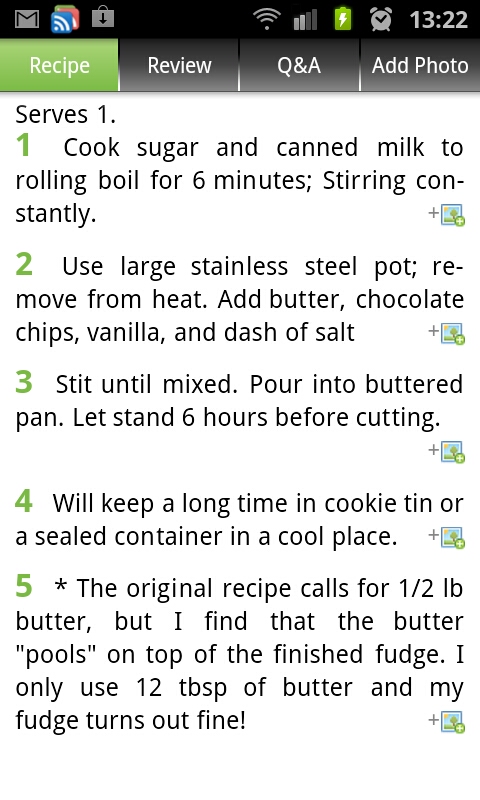
And viewing recipes gives you a clear list of the ingredients and steps for preparing the dish:
A nice feature is you can switch between US (imperial) and Metric measuring systems, so it caters pretty much for everyone.
Adding stuff to your shopping list requires a very easy registration where you only have to enter your name.
As for the categories, there's A LOT!! And literally thousands of recipes to choose from.
You can even change the theme of the home screen for the app:
If you are in any way interested in food and preparing it, this is definitely the app to get. The only small complaint I have, and this is by no means a deal breaker, is that not all the recipes includes photos. I tend to not even look at recipes when they don't have photos included - I want to see what I'm going to make damnit! :)
Get it here
Till next time!
I was browsing the app market, and saw Recipe Search there in the list, and decided to download it to have a look what it's about:
It's basically an app that gives you access to a huge online database of all kinds of different recipes. It also has some nice features like the ability to create shopping lists, or leave comments and ratings on other people's recipes.
There's a What's new? category as well, which lists the latest recipes added:
And viewing recipes gives you a clear list of the ingredients and steps for preparing the dish:
A nice feature is you can switch between US (imperial) and Metric measuring systems, so it caters pretty much for everyone.
Adding stuff to your shopping list requires a very easy registration where you only have to enter your name.
As for the categories, there's A LOT!! And literally thousands of recipes to choose from.
You can even change the theme of the home screen for the app:
If you are in any way interested in food and preparing it, this is definitely the app to get. The only small complaint I have, and this is by no means a deal breaker, is that not all the recipes includes photos. I tend to not even look at recipes when they don't have photos included - I want to see what I'm going to make damnit! :)
Get it here
Till next time!
Monday, September 12, 2011
Standard Calculator, and some great replacements
The Samsung Galaxy S2 obviously (like all phones) comes with a calculator app. I had a quick look at it, and it is very basic (I think the only advanced feature it contains is the ability to use parentheses, or round brackets if you will).
The only option it includes is to change the text size, and to clear the history. As you go along, it keeps everything in the display part about the keypad (you can swipe down the keypad section to see everything a bit more clearly).
EDIT: It turns out there's a bit more to the standard calculator app that what I first noticed. If you turn the phone horizontally, you get access to a full scientific calculator. *sheepish grin* - Thanks Martin for pointing that out!
Anyway, a short while ago I need a scientific calculator (EDIT: see above if you want to use the normal calculator app for that...), because I had to work with Sin Cos and Tan (uggh...). I did a quick search on the App Market and got myself RealCalc, which even looks like the same Sharp calculators we had at school:
Ahh that's a lot better :) Get it here
It even includes some nice features like a unit converter, and constant values:
Pretty neat!
I showed off my new snazzy scientific calculator app to my father-in-law, who is a mechanical engineer, and he asked me if there's an app like his old HP-48, which is a graphic calculator using the Reverse Polish Notation (big words!) - of course I quickly had a look, and downloaded Droid48, which is basically an exact copy of the HP one:
It works way different than a normal, human calculator :) - but if you're an engineer and will be needing one of these, luckily there is one available! Get it here
There you have it, some info on the basic calculator app, and 2 great replacements if you need just a little bit more!
Till next time!
The only option it includes is to change the text size, and to clear the history. As you go along, it keeps everything in the display part about the keypad (you can swipe down the keypad section to see everything a bit more clearly).
EDIT: It turns out there's a bit more to the standard calculator app that what I first noticed. If you turn the phone horizontally, you get access to a full scientific calculator. *sheepish grin* - Thanks Martin for pointing that out!
Anyway, a short while ago I need a scientific calculator (EDIT: see above if you want to use the normal calculator app for that...), because I had to work with Sin Cos and Tan (uggh...). I did a quick search on the App Market and got myself RealCalc, which even looks like the same Sharp calculators we had at school:
Ahh that's a lot better :) Get it here
It even includes some nice features like a unit converter, and constant values:
Pretty neat!
I showed off my new snazzy scientific calculator app to my father-in-law, who is a mechanical engineer, and he asked me if there's an app like his old HP-48, which is a graphic calculator using the Reverse Polish Notation (big words!) - of course I quickly had a look, and downloaded Droid48, which is basically an exact copy of the HP one:
It works way different than a normal, human calculator :) - but if you're an engineer and will be needing one of these, luckily there is one available! Get it here
There you have it, some info on the basic calculator app, and 2 great replacements if you need just a little bit more!
Till next time!
Friday, September 9, 2011
Mini Review: Official Rugby World Cup App
The 2011 Rugby World Cup started today, and I thought I'd also get in the whole spirit of things - by reviewing the official RWC2011 Android App - get it here.
The app is actually quite cool, it pretty much gives you all the info you could possibly want about the Rugby World Cup - you have news:
Congrats to the All Black for winning the opening match against Tonga!
As the news articles get added, so they become available in the app for you to read up on what's going on in the RWC.
Next you have the Match Centre - here you get all kinds of info regarding the matches themselves, including stuff like Results, what's happening Today and the Fixtures:
See? All the info you could want so far :)
The app also includes a Videos section, where you can watch movie clips and highlights of games played.
Then, the Teams section is quite in depth - you get info on all the teams participating, as well as info and stats on the players of each team:
Quite comprehensive stats and all, I was just a little disappointed that they didn't have photos of all the players - hopefully these will get added soon, but it's definitely not a deal breaker (also since it's 100% free of course!)
The fifth option is about the tournament, which includes the stats of each team, how many points they have on the log, and the knockout rounds info:
And finally you have the Fan Zone - here you can do stuff like submit questions to the pros, see what's going on in New Zeeland, get info on the stadiums (very in depth - info on each stadium, where it's located on the map, and games that will be played there, etc.), buy tickets, etc:
So, in short, if you're any sort of Rugby fan, and have an Android based phone, you'll definitely want to get this app - it gives you all the info you'd ever need, and more!
Enjoy the RWC! And Good Luck Springboks, hope you can bring that trophy home a third time!
Till next time!
The app is actually quite cool, it pretty much gives you all the info you could possibly want about the Rugby World Cup - you have news:
Congrats to the All Black for winning the opening match against Tonga!
As the news articles get added, so they become available in the app for you to read up on what's going on in the RWC.
Next you have the Match Centre - here you get all kinds of info regarding the matches themselves, including stuff like Results, what's happening Today and the Fixtures:
See? All the info you could want so far :)
The app also includes a Videos section, where you can watch movie clips and highlights of games played.
Then, the Teams section is quite in depth - you get info on all the teams participating, as well as info and stats on the players of each team:
Quite comprehensive stats and all, I was just a little disappointed that they didn't have photos of all the players - hopefully these will get added soon, but it's definitely not a deal breaker (also since it's 100% free of course!)
The fifth option is about the tournament, which includes the stats of each team, how many points they have on the log, and the knockout rounds info:
And finally you have the Fan Zone - here you can do stuff like submit questions to the pros, see what's going on in New Zeeland, get info on the stadiums (very in depth - info on each stadium, where it's located on the map, and games that will be played there, etc.), buy tickets, etc:
So, in short, if you're any sort of Rugby fan, and have an Android based phone, you'll definitely want to get this app - it gives you all the info you'd ever need, and more!
Enjoy the RWC! And Good Luck Springboks, hope you can bring that trophy home a third time!
Till next time!
Subscribe to:
Posts (Atom)