Showing posts with label hubs. Show all posts

Thursday, November 10, 2011

Music Hub Still not in SA

Yes, if you live in South Africa, and plan on getting the Samsung Galaxy S2 for it's "music hub" feature, don't because it is still not available locally:


Yup, very annoying! At least the Advertising Standards Authority of South Africa forced Samsung to remove the advert for the music hub on their website - see that article here.

Saturday, August 27, 2011

Readers Hub: Magazines

The last Readers Hub feature is Magazines, which is powered by the very popular Zinio - Now, since I already have this app on our iPad, it was just a matter of logging in on the Readers Hub one, and there was the magazine I just bought a subscription of :)

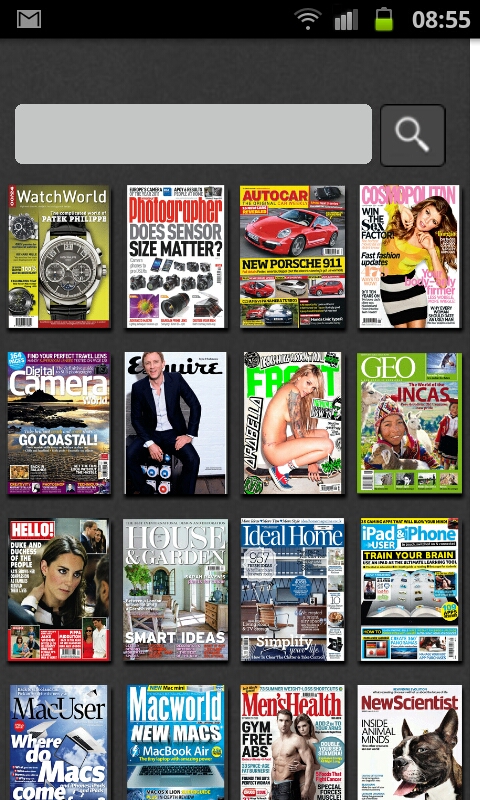
Anyway, opening up the Magazine part of the Hub first shows that it is powered by Zinio, after which you get to a list of all the magazines you've bought, and a few free ones are included by default as well:


I've subscribed to our local Popular Mechanics, a big favourite of mine! Best part is, it costs about the third of a printed subscription, and that's me doing my part on saving the environment as well!


Paging through the magazine is once again as simple as tapping on the edge, or swiping as if turning a page. The nice thing is you get the exact same copy as the printed one.

While paging through the magazine, you'll see the pages at a glance, and then you simply double tap, or pinch zoom to the area you'd like to read:


The app also, of course, includes the various ways of browsing the online stores of magazines, and there's A LOT! You have your normal categories, and stuff like "featured", "new arrivals", "top sellers", etc.


Browsing a category gives you all the magazines, from where you can tap on the cover of the magazine, and from there you can decide how you'd like to buy it, either a single issue, or a subscription.


I personally prefer doing the buying through Zinio's website. This way it gets added to your phone automatically, or wherever you're logged in on your Zinio account.


I'll do a purchase through the phones app at some stage, and amend this review on how that goes...

To summarize - the Readers Hub application that comes with the Samsung devices is in my personal opinion really nice. There are some dedicated software that might be better at the various sections (that is Newspapers, Books and Magazines) - but for normal use the Readers Hub is more than sufficient.

At the time of writing this, I've only had my Galaxy S2 for a month or so, so as always, as time goes on, I'll use the apps I review more and amend the reviews where needed.

In the meantime, if you've got a Samsung device, and haven't checked out the Readers Hub, you better go do it, even if it is just to drool over the fancy cars, watches an yachts  in the free copy of  Robb Report!

Till next time!

Tuesday, August 23, 2011

Readers Hub: Books

Included with the Readers Hub application on the Galaxy S2 is the ability to read books (See my review on the Newspapers part of the Readers Hub). It uses the Kobo e-reader software, and is very straightforward and simple to use.

Now, even though the Galaxy S2 has that nice and big 4.3" Super AMOLED Plus screen, it's still not a replacement for your kindle or regular books - but, it's a very nice thing to have when there's nothing else available!

Now, I haven't actually purchased any books through the app (will let you know if I ever do of course), but there are many free books available. I downloaded Mary Shelly's Frankenstein, and Sun Tzu's Art of War:


The app allows you to easily browse through various categories, and making selections on what to read is as straightforward as you'd expect:


The main part, which of course is actually reading the book ;) is very easy and pleasant to use. There are normal settings you'd expect, like being able to save a bookmark of where you are in the book, or change the font size. It even has a cool "night mode" feature, which inverts the colours (white text on black background instead of black on white...)

One thing that still amazes me about the Galaxy S2 is how black the screen is when it's displaying black! The pixels are actually turned off completely, so they emit no light whatsoever. When viewing stuff on the phone that has a night mode feature at night is always amazing to behold!

Anyway, back to the book reader app - I'm not so sure that I'll ever read a full book on my phone, the screen is big and clear, but it just doesn't beat a good old fashioned book, or even the excellent Amazon Kindle.

Here are some more screen shots of how the text looks:


The above screen shots shows the different font sizes, as well as what "night mode" looks like.

Turning pages is done by a simple tap or a swipe, which produces a very nice looking page flip effect (which you can also change in the settings if  you want...). 

That pretty much covers how the Readers Hub Books part works. Very nice indeed!

Next time I'll cover the Magazine part.

Anyway, till next time!

Thursday, August 18, 2011

Readers Hub: Newspapers

The Galaxy S2 includes Samsung's Hubs, which includes four Hubs - Social, Readers, Music and Game Hubs. I have decided to use them all (or at least the ones that's available in South Afirca (Grrr at Music Hub)), and let you know what I experience for each one.

I've decided to start with the Readers Hub. It consists out of three sections, namely News, Magazines and Books.


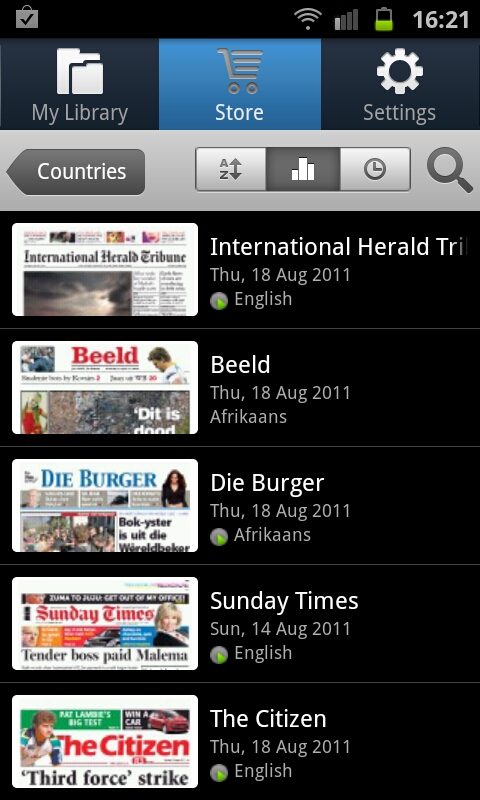
Tapping on the News section, opens up the news reader part of the Readers Hub. At the top we have three options, namely My Library (containing everything you've purchased), Store and Settings. This screen shot is on the Store tab, and here is a list of all the countries, and next to the name the number of publications that country has to offer through this app. See South Africa has 23 - not too shabby :) Also, another nice thing is you get 7 free credits to try out the feature :D


Tapping on the country, will take you to the list of newspapers available there:


I used on of my free credits especially for this blog so that I can show you how it works (I'm nice hey? :) - I got the "Beeld" newspaper - today's (18 August 2011) copy:


You can see in the above screen shot, that you can have the one you're buying be delivered automatically, and you can add it to your favourites. Quite nice features :)

After selecting the paper to get, it started downloading:


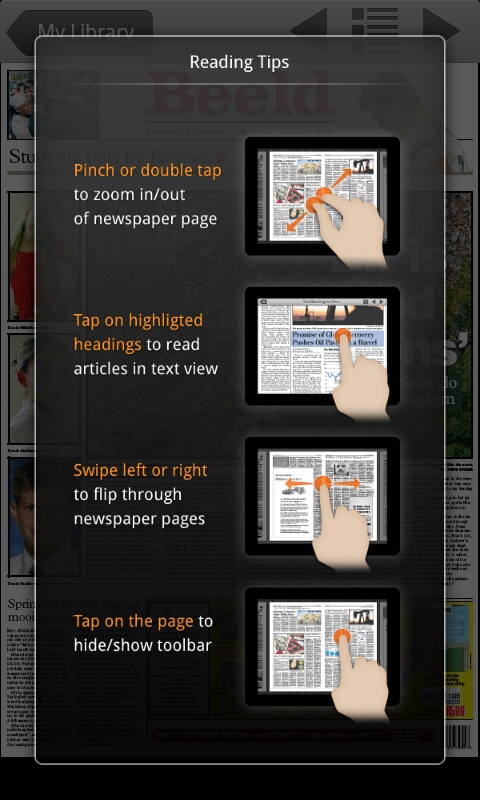
After the download was done, I tapped on the Newspaper, and got this welcome screen with some instructions and tips on how to read the paper:


Pretty straightforward as you can see. I had a quick scan through the paper, and found it very easy to navigate and read the articles.


Click on the images above to view them in more detail.

That covers the Newspaper part of the Readers Hub that comes standard with the Galaxy S2. I must admit, I was a bit skeptical at first, I usually don't like the "default" apps that come with phones, but this one I'm really impressed with.

To get a new Newspaper to read is a quick and painless exercise. Now, I haven't bought one yet (downloaded the one in this post with one of my free credits), but as soon as I do, I'll amend this post with how that went...

Till next time!

Galaxy S2 Hubs

Howdy folks, it's been a while since I had the time to post something new here. I've decided to make my next post about the "Hubs" that comes with the phone. There's four of them, namely Social Hub, Readers Hub, Music Hub and Game Hub.

Now first thing's first - the Music Hub, EVEN THOUGH Samsung Advertises it here in South Africa, is NOT available in "your location" as the phone puts it. So don't expect any info regarding that from me - gotta love living in a third world country hehe :)

I actually filed a ASA (Advertising Standards Authority of South Africa) complaint about that, will keep you guys posted on what they say...

EDIT: Well, it turned out that the ASA ruled in my favour, and Samsung had to remove their advertising of the music hub on their South African section of their site - click here to read up on it on My Broadband

Anyway, let's get to the hubs that actually work:

Social Hub
The Social Hub is Samsung's attempt at combining all of your social life related stuff in one place. For example, you can set it up to include your Twitter feed, Facebook feed, IM accounts, Email accounts and so on. I tried it when I first got the phone, but I wasn't very happy with the interface, I personally prefer using the dedicated apps for each one. One annoying thing was that you cannot add more than one of each type of account (unless I missed it) - I personally have two twitter accounts, and would have loved to have them both on there, but alas, you cannot.

I'll experiment some more with the Social Hub to see if it's worth using or not, but it doesn't look good so far.

Readers Hub
The Readers Hub is a place where you can read newspapers and magazines on your phone. According to Samsung's website:

"Books
From classics to best-sellers, enjoy access to over 2.2 million eBooks, now with amazing new interactive features like the page curl effect.

Magazines
With over 2,300 Magazines in 22 languages, featuring both article and page view, you will never be short of an interesting read.

Newspapers
Enjoy easy access to breaking news at your fingertip with access to over 2000 newspapers in 49 languages"

I will have a look and let you know what I discover on the Readers Hub.

EDIT: Here are links to the reviews of the Readers Hub sections: NewspapersBooks and Magazines.

Game Hub
This is where you get access to what Samsung calls "Social Games" and "Premium Games" - I downloaded a free demo of Assassin's Creed (a premium game), and played a few minutes and it was actually quite cool.

The only problem I can already see with the Game Hub is the fact that there's a total of only 13 premium games. Whoopdidoo!

That's a short intro on the four hubs that Samsung has included on the phone. As I play around with them, I'll post more in depth info for each.

So far I'm not that much impressed by it at all, in my honest opinion. Anyway, I'm open minded, and will give them all a good try and see if they can maybe change my mind :)

Till next time